

How it works
Choose the Right Card in Seconds
Set up the banks you use only once. After that, simply choose your store and amount you intend to spend to quickly show the best card to use, every time.
Step 1 · Set up once
Tell RandPerks Which Cards You Have
Switch on the banks you use. Each one asks a few short questions, and only questions that change what you earn.
- Which account you have, for example FNB Aspire or FNB Premier
- Your reward level, such as eBucks Level 3 or Vitality Money Gold
- Which cards you have: debit, credit, Amex or Visa/Mastercard
- If you pay with your virtual card in your bank's app or a phone wallet, or only use physical cards
Not sure of your level? Our in-app guide will tell you where to look or if your bank account type even has levels..

Step 2 · Your purchase
Pick a Store and Amount
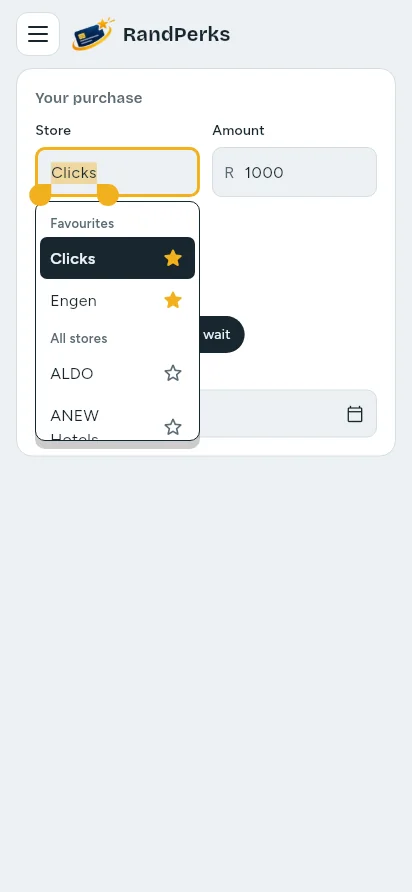
Type the store and how much you might spend. Then choose:
- In store or online. Rates are sometimes different, depending on what you choose.
- Buying today, or "I can wait". If you can wait, choose the latest date you'd buy, up to 30 days ahead, and RandPerks checks every day until then for better rewards.
Star the stores you use most and they'll always be at the top of the list. RandPerks covers over 100 stores.
Step 3 · The method
How Each Card's Reward Is Worked Out
RandPerks keeps a list of the rewards each bank publishes, and checks it against every card type you own.
We Check What Applies to You
Only rewards that match your store, how you're paying, your account, card and reward level count will be shown. Weekday deals and bonus days will also show if we have that data.
Adds Bonuses and Tells You About Limits
Bonuses that stack are added on top, and monthly limits are taken into account. RandPerks doesn't know what you've already spent this month, but we'll give you the info you need upfront.
Compares Your Cards in Rand
Points are turned into rands so that different programmes can be compared fairly, and the card that gives you the most money back comes first.
The results
What You'll See
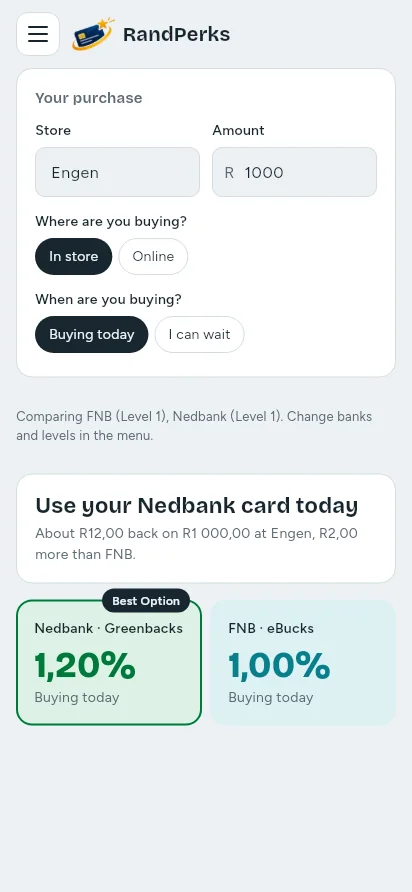
In the easiest way possible, we'll tell you which card gives you the best rewards possible..
- Best Option shows the best card to use. Next best shows which card to use if you're already passed the spending limit on your current card.
- Each card shows its rate, the points you'd earn and what they're worth in rand.
- Not recommended here means either the bank doesn't clearly publish its rate for that store, or that we simply don't have that data available yet. No rewards here means the card earns nothing here.
- Tap Details to see how much qualifies, the monthly limit and allowance, and any steps you need to take, like buying in the bank's app. These are all the more technical details that you can easily access.
I can wait
Sometimes the Best Card Is the Same Card, but on a Different Day
Choose "I can wait" and RandPerks checks every day up to your chosen date. It recommends the best day and card to use so that you'll get the maximum rewards (for example, a bonus day).
Example from the RandPerks rewards engine for an FNB Premier Level 3 virtual debit card with a family profile, spending R1 000,00 at Clicks.
Keep Exploring

Make Every Swipe Count.
Get more from the cards you already own. Find your best reward opportunities instantly with RandPerks.
Coming soon to Google Play